---
title: "Manage: Benefits"
description: Make changes to the details of your benefits package, to update how your benefits are benchmarked against the market.
---
[Skip to content](https://help.ravio.com/manage-benefits#main-content)
English
Show submenu for translations

Open main navigation
Close main navigation
- English
Show submenu for translations
- [Contact us](https://fa3fd.share-eu1.hsforms.com/2IkfMVpstTUWvffP5uESSLg)
[Contact us](https://fa3fd.share-eu1.hsforms.com/2IkfMVpstTUWvffP5uESSLg)
How can we help you?
- There are no suggestions because the search field is empty.
1. [Ravio Help Centre](https://help.ravio.com/?hsLang=en)
2. [Ravio feature guides](https://help.ravio.com/ravio-feature-guides?hsLang=en)
3. [Manage my data](https://help.ravio.com/ravio-feature-guides?hsLang=en#manage-my-data)
# Manage: Benefits
## Make changes to the details of your benefits package, to update how your benefits are benchmarked against the market.
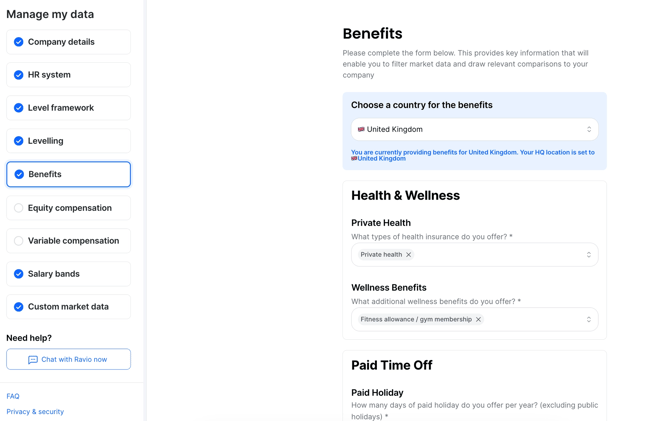
From the Benefits screen, review the benefits information you provided during onboarding, and make changes to the details for each benefit type.
**Tips & Tricks**
• You can enter benefits details for multiple locations by changing the country option at the top of the page. Benefits details already entered for other country locations will be saved when switching between countries.
- [Getting started](https://help.ravio.com/getting-started?hsLang=en#main-content)
- [Onboarding](https://help.ravio.com/getting-started?hsLang=en#onboarding)
- [Benchmarking](https://help.ravio.com/getting-started?hsLang=en#benchmarking)
- [Pay equity](https://help.ravio.com/getting-started?hsLang=en#pay-equity)
- [Video guides](https://help.ravio.com/getting-started?hsLang=en#video-guides)
- [Using Ravio with AI tools](https://help.ravio.com/getting-started?hsLang=en#using-ravio-with-ai-tools)
- [Integrations and data sharing](https://help.ravio.com/integrations-and-data-sharing?hsLang=en#main-content)
- [Setting up your HRIS integration](https://help.ravio.com/integrations-and-data-sharing?hsLang=en#setting-up-your-hris-integration)
- [Variable and equity data](https://help.ravio.com/integrations-and-data-sharing?hsLang=en#variable-and-equity-data)
- [Manually sharing employee data](https://help.ravio.com/integrations-and-data-sharing?hsLang=en#manually-sharing-employee-data)
- [Setting up your ATS integration](https://help.ravio.com/integrations-and-data-sharing?hsLang=en#setting-up-your-ats-integration)
- [Managing your integration](https://help.ravio.com/integrations-and-data-sharing?hsLang=en#managing-your-integration)
- [Video guides](https://help.ravio.com/integrations-and-data-sharing?hsLang=en#video-guides)
- [Ravio feature guides](https://help.ravio.com/ravio-feature-guides?hsLang=en#main-content)
- [Salary bands](https://help.ravio.com/ravio-feature-guides?hsLang=en#salary-bands)
- [Explore the market](https://help.ravio.com/ravio-feature-guides?hsLang=en#explore-the-market)
- [Employee mapping & levelling](https://help.ravio.com/ravio-feature-guides?hsLang=en#employee-mapping-levelling)
- [Manage my data](https://help.ravio.com/ravio-feature-guides?hsLang=en#manage-my-data)
- [Settings](https://help.ravio.com/ravio-feature-guides?hsLang=en#settings)
- [Analyse your company](https://help.ravio.com/ravio-feature-guides?hsLang=en#analyse-your-company)
- [EU Pay Transparency](https://help.ravio.com/ravio-feature-guides?hsLang=en#eu-pay-transparency)
- [User and access management](https://help.ravio.com/user-and-access-management?hsLang=en#main-content)
- [User permissions](https://help.ravio.com/user-and-access-management?hsLang=en#user-permissions)
- [Single Sign On (SSO)](https://help.ravio.com/user-and-access-management?hsLang=en#single-sign-on-sso)
- [Benchmarking and data confidence](https://help.ravio.com/benchmarking-and-data-confidence?hsLang=en#main-content)
- [Data](https://help.ravio.com/benchmarking-and-data-confidence?hsLang=en#data)
- [Troubleshooting and support](https://help.ravio.com/troubleshooting-and-support?hsLang=en#main-content)
- [Contact support](https://help.ravio.com/troubleshooting-and-support?hsLang=en#contact-support)
- [FAQ](https://help.ravio.com/faq?hsLang=en#main-content)
- [Billing and invoices](https://help.ravio.com/faq?hsLang=en#billing-and-invoices)
- [Compliance](https://help.ravio.com/faq?hsLang=en#compliance)
- [Ravio community](https://help.ravio.com/faq?hsLang=en#ravio-community)
- [Sales](https://help.ravio.com/faq?hsLang=en#sales)
- [Integrations](https://help.ravio.com/integrations?hsLang=en)
- [Uncategorized](https://help.ravio.com/uncategorized?hsLang=en)
- Home
- Products
- Pricing
- Blog
- Company
[](http://ravio.com)
[mailto:hello@ravio.com](mailto:hello@ravio.com)
Copyright © 2026, Ravio Technologies Ltd