---
title: How to integrate with Carta Europe
description: A step by step guide showing how to connect Ravio with Carta Europe
---
[Skip to content](https://help.ravio.com/carta-europe-previously-capdesk#main-content)
English
Show submenu for translations

Open main navigation
Close main navigation
- English
Show submenu for translations
- [Contact us](https://fa3fd.share-eu1.hsforms.com/2IkfMVpstTUWvffP5uESSLg)
[Contact us](https://fa3fd.share-eu1.hsforms.com/2IkfMVpstTUWvffP5uESSLg)
How can we help you?
- There are no suggestions because the search field is empty.
1. [Ravio Help Centre](https://help.ravio.com/?hsLang=en)
2. [Integrations and data sharing](https://help.ravio.com/integrations-and-data-sharing?hsLang=en)
3. [Variable and equity data](https://help.ravio.com/integrations-and-data-sharing?hsLang=en#variable-and-equity-data)
# How to integrate with Carta Europe
## A step by step guide showing how to connect Ravio with Carta Europe
### Prerequisites
Only someone with the Administrator role in Carta. To check this you can go to **Company settings \> Administrator settings** and ensure that your user is in this list, and has a tick underneath the “Full write access” permission like the below.
If this is not the case, you can share this guide with somebody who does and they can continue this integration process.
---
### Step by Step Instructions
#### Step 1 - Create a new Read-Only Administrator user for Ravio
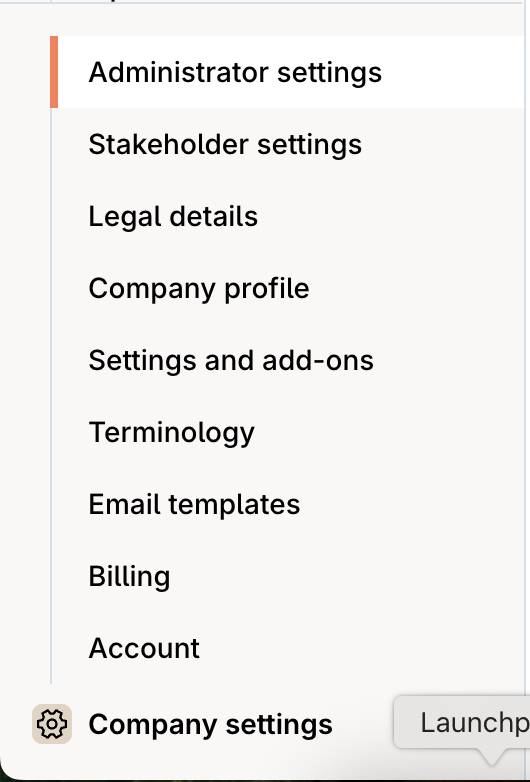
In your Carta environment, navigate to **Company settings \> Administrator settings** and then select **Add administrator**.
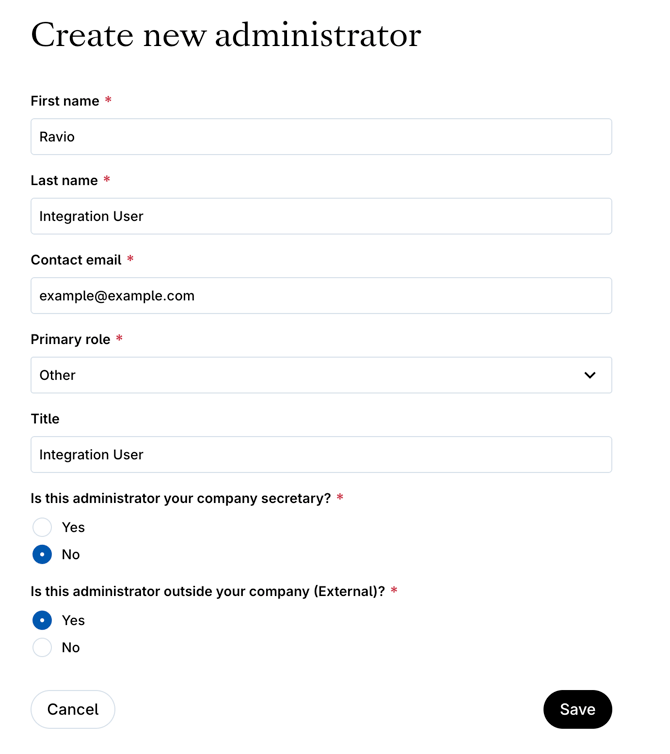
Create a new Administrator in Carta, giving it a descriptive name and ensuring that the below settings are added:
- Contact email - **`integrations-access@ravio.com`**
- Primary Role - Other
- Title - Ravio Integration User
- Is this administrator your company secretary? - No
- Is this administrator outside your company (External)? - Yes
#### Step 2 - Make this Administrator Read Only
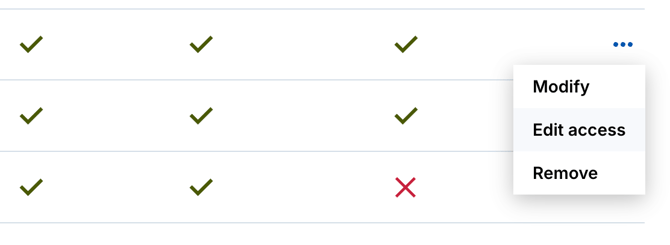
Now in the Administrators list you should see your new user. Now go to **Edit access** for your new user.
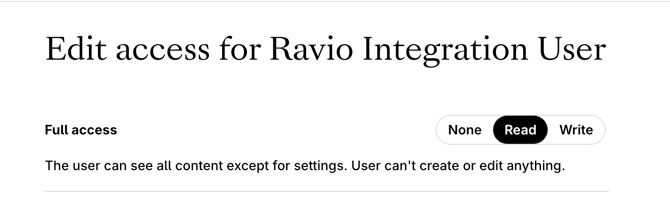
The two main settings you want to update are:
- **Full access = Read**
- **Portfolio funding = Read**
Save the changes.
- [Getting started](https://help.ravio.com/getting-started?hsLang=en#main-content)
- [Onboarding](https://help.ravio.com/getting-started?hsLang=en#onboarding)
- [Benchmarking](https://help.ravio.com/getting-started?hsLang=en#benchmarking)
- [Pay equity](https://help.ravio.com/getting-started?hsLang=en#pay-equity)
- [Video guides](https://help.ravio.com/getting-started?hsLang=en#video-guides)
- [Using Ravio with AI tools](https://help.ravio.com/getting-started?hsLang=en#using-ravio-with-ai-tools)
- [Integrations and data sharing](https://help.ravio.com/integrations-and-data-sharing?hsLang=en#main-content)
- [Setting up your HRIS integration](https://help.ravio.com/integrations-and-data-sharing?hsLang=en#setting-up-your-hris-integration)
- [Variable and equity data](https://help.ravio.com/integrations-and-data-sharing?hsLang=en#variable-and-equity-data)
- [Manually sharing employee data](https://help.ravio.com/integrations-and-data-sharing?hsLang=en#manually-sharing-employee-data)
- [Setting up your ATS integration](https://help.ravio.com/integrations-and-data-sharing?hsLang=en#setting-up-your-ats-integration)
- [Managing your integration](https://help.ravio.com/integrations-and-data-sharing?hsLang=en#managing-your-integration)
- [Video guides](https://help.ravio.com/integrations-and-data-sharing?hsLang=en#video-guides)
- [Ravio feature guides](https://help.ravio.com/ravio-feature-guides?hsLang=en#main-content)
- [Salary bands](https://help.ravio.com/ravio-feature-guides?hsLang=en#salary-bands)
- [Explore the market](https://help.ravio.com/ravio-feature-guides?hsLang=en#explore-the-market)
- [Employee mapping & levelling](https://help.ravio.com/ravio-feature-guides?hsLang=en#employee-mapping-levelling)
- [Manage my data](https://help.ravio.com/ravio-feature-guides?hsLang=en#manage-my-data)
- [Settings](https://help.ravio.com/ravio-feature-guides?hsLang=en#settings)
- [Analyse your company](https://help.ravio.com/ravio-feature-guides?hsLang=en#analyse-your-company)
- [EU Pay Transparency](https://help.ravio.com/ravio-feature-guides?hsLang=en#eu-pay-transparency)
- [User and access management](https://help.ravio.com/user-and-access-management?hsLang=en#main-content)
- [User permissions](https://help.ravio.com/user-and-access-management?hsLang=en#user-permissions)
- [Single Sign On (SSO)](https://help.ravio.com/user-and-access-management?hsLang=en#single-sign-on-sso)
- [Benchmarking and data confidence](https://help.ravio.com/benchmarking-and-data-confidence?hsLang=en#main-content)
- [Data](https://help.ravio.com/benchmarking-and-data-confidence?hsLang=en#data)
- [Troubleshooting and support](https://help.ravio.com/troubleshooting-and-support?hsLang=en#main-content)
- [Contact support](https://help.ravio.com/troubleshooting-and-support?hsLang=en#contact-support)
- [FAQ](https://help.ravio.com/faq?hsLang=en#main-content)
- [Billing and invoices](https://help.ravio.com/faq?hsLang=en#billing-and-invoices)
- [Compliance](https://help.ravio.com/faq?hsLang=en#compliance)
- [Ravio community](https://help.ravio.com/faq?hsLang=en#ravio-community)
- [Sales](https://help.ravio.com/faq?hsLang=en#sales)
- [Integrations](https://help.ravio.com/integrations?hsLang=en)
- [Uncategorized](https://help.ravio.com/uncategorized?hsLang=en)
- Home
- Products
- Pricing
- Blog
- Company
[](http://ravio.com)
[mailto:hello@ravio.com](mailto:hello@ravio.com)
Copyright © 2026, Ravio Technologies Ltd